Pipe-Driven Development
How I stopped debugging business logic and started reading it.
Every real application grows the same tumor. A request comes in, and somewhere between the controller and the response there's a 400-line method — or worse, a chain of services calling services — that validates, checks, scores, routes, logs, and decides. It works. Then six months later someone asks "why did this particular request end up here?" and the only honest answer is: open the debugger and step through it, because nobody can read that code and know.
I got tired of that answer. So I started writing business flows a different way, and I've been doing it long enough now that it deserves a name: pipe-driven development.
The idea is simple. A business flow is a sequence of named stages. Each stage is a short list of small rules. You write it so the flow reads like a table of contents, and the framework records every rule that runs — what it decided, how long it took, why it stopped — so the log is the explanation. You never step through it again. You open the log.
What it looks like
Here's a real shape: an ad-click intake, the kind of thing that sits in front of a high-volume tracking system. Every click comes in, runs a gauntlet, and ends up routed, flagged, or dead-ended.
PipeManager::create([

    PipeHub::create()
        ->name('Validate & start session')
        ->description('Is this a complete, signed click for a live campaign?')
        ->addPipes([
            RequireTrackingParameters::class,
            VerifyClickSignature::class,
            RecognizeCampaign::class,
            StartClickSession::class,
        ])
        ->stopOnFatal(),              // a bad click ends the whole flow here

    PipeHub::create()
        ->name('Suppression')
        ->description('Has this visitor asked the advertiser not to contact them?')
        ->addPipes([
            CheckAdvertiserSuppressionList::class,
        ])
        ->skipIf(fn ($click) => $click->campaign()->isNewsletter())
        ->stopOnFatal(),

    PipeHub::create()
        ->name('Bot checks')
        ->description('Does this look like a person, not a script or a server?')
        ->addPipes([
            DetectHostingProviderIp::class,
            MatchKnownBotUserAgents::class,
            ScoreClickVelocity::class,
        ])
        ->then(fn ($click) => $click->botSignals() >= 2 ? $click->flag('Two or more bot signals') : null),

    PipeHub::create()
        ->name('Route')
        ->description('Landing page, review queue, or a safe dead end')
        ->addPipes([
            ChooseDestination::class,
        ]),

])
    ->name('Ad click intake')
    ->subject($click)
    ->then(fn ($click) => $click->markComplete())
    ->sendIt();
You don't have to know the framework to read that. A new engineer — or you, in six months — can look at it and understand the entire business process in thirty seconds. The stages are named, each one has a one-sentence intent, and the order is the order. The flow is the documentation, and since it is the code, it can't drift from it.
A rule is one small class
Each pipe is a small, testable class that does one thing and reports a result.
class EnforceCampaignCountries extends PipeRule
{
    public static $name = 'Enforce campaign countries';
    public static $description = 'Only countries the campaign buys get through';

    public function enforceCampaignCountries($click, GeoDatabase $geo)
    {
        $targets = $click->campaign()->countries;

        if ($targets === []) {
            return $this->skip('Campaign targets every country');
        }

        if (! in_array($click->country, $targets, true)) {
            $this->fatal("Visitor is in {$click->country}; campaign targets ".implode(', ', $targets));
        }

        return self::SUCCESS;
    }
}
A rule returns a result (SUCCESS, FAIL, SKIP, …) or raises a fatal. It's resolved through the container, so its dependencies are injected. It's small enough to unit-test in isolation and name clearly. You end up with a vocabulary of rules — VerifyClickSignature, MatchKnownBotUserAgents, EnforceDailyClickCap — and composing a new flow is mostly arranging rules you already have.
The part that changed how I work: the log is a timeline
Every rule that runs is recorded with a timestamp, a result and a reason. When someone asks why a request ended up where it did, I query the log.
   0.686 ms  RequireTrackingParameters        1
   1.253 ms  VerifyClickSignature             1
   1.325 ms  ResolveVisitorCountry            Resolved 203.0.113.9 to CA
   1.402 ms  EnforceCampaignCountries  fatal  Visitor is in CA; campaign targets US
   1.416 ms  PipeHub                   warn   Stopped by a fatal. The rest of this hub does not run.
   1.437 ms  CheckAdvertiserSuppressionList    Skipped: the hub's skipIf() returned true
A few things the log gives you in production:
- Skipped steps are recorded too. The suppression check above didn't silently fail to run. The log shows it was reached and skipped, rule by rule, because this was a newsletter campaign. When someone asks whether you check for something, you can show them the run where you checked and it didn't apply.
- The log persists. There is one row per run, written once when the flow ends, whether it completed, stopped, redirected or threw. It's stored as JSON (or serialized) and can be rebuilt into this same timeline later. When a client asks about one specific request from last Tuesday, you pull one row and have the whole story, with timings.
- Stopping is visible.
stopOnFatal(),skipIf()and a rule raisingfatal()are declared right on the flow, and each one shows up in the log with a reason.
Because the record is structured data, you can parse it into anything. Here's one run, a single ad click, rendered from its saved log:
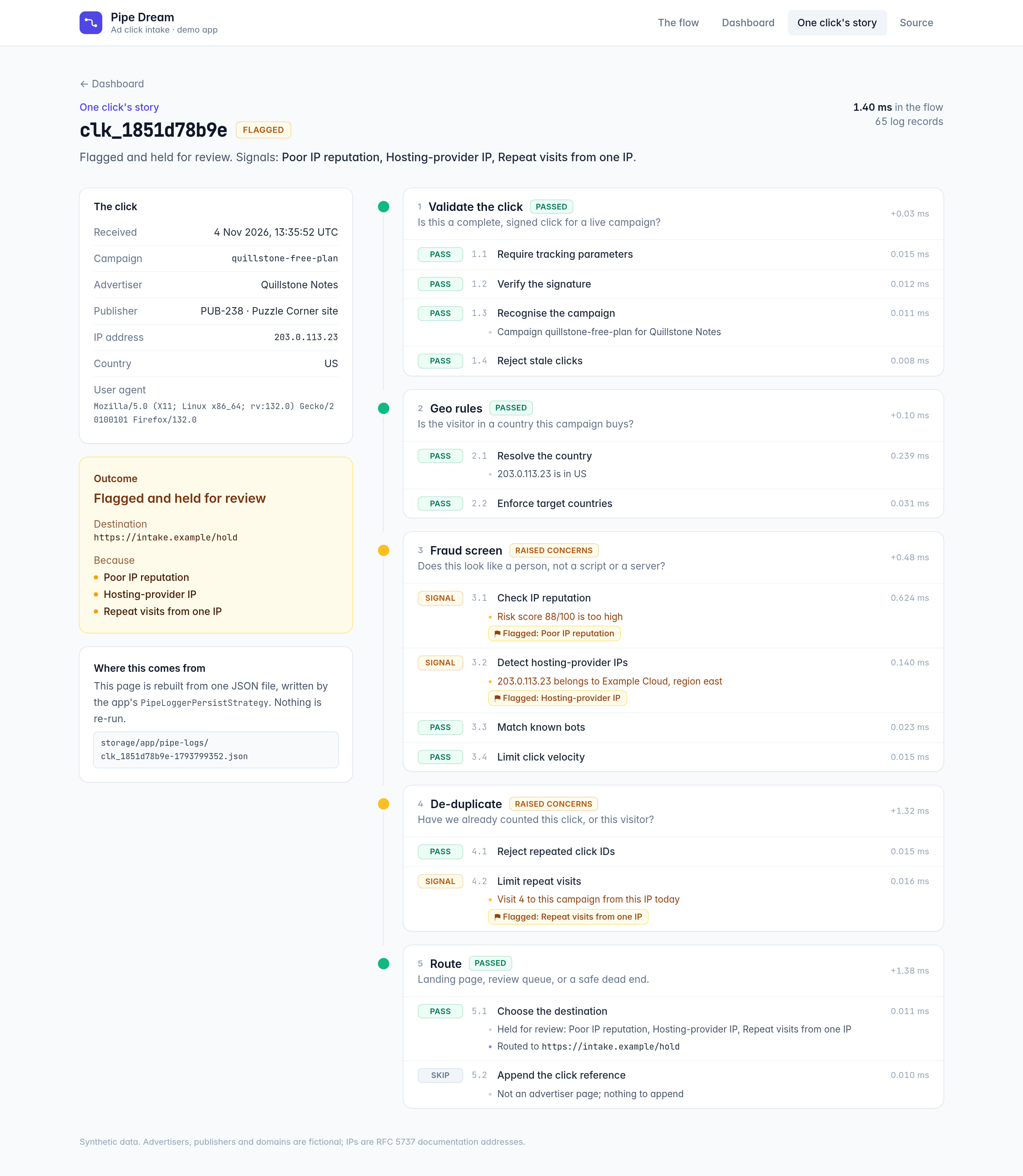
This view is only the log, parsed into a UI. It shows every stage, pass, skip and flag for one real click, long after it ran.
Why I'd do it this way
The pipeline pattern is old, and Laravel ships Illuminate\Pipeline. What I do with it is write every meaningful business flow as a named, self-documenting pipeline with a full audit trail, by default, for all of them.
That has paid off in four places:
- Onboarding: a new person reads the flow from top to bottom and knows the process.
- Debugging: I read the log, and it shows which rule decided what.
- Auditing: "prove to me this request was handled correctly" becomes a database query.
- Changes: you add or reorder a named rule, and the diff shows exactly what moved in the business process.
It grew out of a real system: the click tracker in front of a high-volume ad-click intake. Before I rewrote it, that script was a black box when it came to time. Some clicks redirected in half a second and others took up to ten, and nobody could say why. Once the flow was broken into steps, with every step timed the same way and every return value logged, the answer was sitting in the log. Debugging went from a mystery to a lookup, and it was immediate. Today every click runs through about ten stages and dozens of rules, with a full audit trail per click, at volume. I never opened a debugger for it. When something looked wrong, I read the log, and the log told me what happened, with timings, every time.
Why it works so well with AI
Every step's timing and result lands in the log as structured data, so an AI can read every single run. Mine watches each one, runs the numbers every day, and tells me what it found: problems, delays, anything unusual, across everything I run through pipes. Nobody has to ask, and nothing goes by unseen.
It also changes how the AI writes code. In this style, the code it writes is a list of steps: small named rules with one job each. That makes this close to a ready-made framework for AI development. The work is already broken into steps that are hard to mess up, so they don't need big refactoring passes or deep reviews, and I'm not spending my time arguing with the AI about engineering. The flow reads like a book, and it runs the same way every time because the backbone is solid.
Testing gets easy too. Every step is a bite-sized rule with one job, so you can test it on its own: give it an input and check what it does. That makes it simple to confirm that each step does exactly what you want, before it ever runs as part of a flow.
From there the AI can keep an eye on the execution for as long as the code runs. Set up this way, it writes the code, improves it using what the log shows, and keeps you informed about all of it, automatically.
I use this approach for almost anything that runs through multiple steps now. It's become my default way to program.
That's pipe-driven development: flows you can read, a log of every run, and my time going into the rules.
Try it
It's a small, zero-config Laravel package: PipeManager, PipeHub, PipeRule, the envelope, the logger, the database persistence, and the introspection methods that let you render a flow from the code itself. MIT licensed, tested across Laravel 9–13.
composer require keaton-php/pipe-dreamRepo, docs and a worked demo: github.com/keaton-php/pipe-dream
Kevin Eaton, senior PHP/Laravel engineer. I build systems where the code explains itself. kevineaton.dev · github.com/keaton-php